
PURPOSE AND SCOPE
This SOP explains how Customer Support staff must handle additional services that require payment to suppliers and/or invoicing clients. It covers when clients should pay suppliers directly, how to document additional services in Ezus, how to apply markup rules, and when to move a ticket to the Invoicing (If Applicable) stage in HubSpot.
The objective is to ensure all financial transactions related to support incidents are correctly documented, quoted, invoiced, and escalated to Finance when needed.
DEFINITIONS
Client Direct Payment
When the client pays the supplier on-site, avoiding internal invoicing.
Internal Invoicing
When Pygmy Elephant pays the supplier and later invoices the client.
Markup Rule
A 20% markup is applied to services Pygmy Elephant pays for unless the client was previously quoted a different amount.
PROCEDURE
1. DETERMINE WHETHER THE CLIENT CAN PAY THE SUPPLIER DIRECTLY
Clients should pay suppliers directly whenever possible to avoid:
- Extra CS workload
- Extra Finance workload
- Payment delays
- Cash handling issues
Use direct payment unless:
- The supplier cannot accept credit cards
- The client has no cash
- Payment must be centralized for operational reasons
If client will pay supplier → Do NOT move to Invoicing stage.
2. DOCUMENT THE SERVICE IN EZUS
For any additional service:
- Open the client’s Ezus itinerary, in the program, on the correct day.
- Add a line item for the service.
- Update the description clearly.
- Enter:
- Net cost (supplier price)
- Gross cost (client-facing price)
- Select the correct supplier who will invoice PE (if applicable).
3. APPLY MARKUP RULES
If client is being invoiced by Pygmy Elephant:
- Add a 20% markup to the supplier cost.
- Use the exchange rate of the day using google.
Exception:
If the client was already quoted a price earlier:
- Honor the original quoted price
- Do NOT adjust pricing retroactively
- Do NOT apply the markup
(Even if you forgot to apply the markup initially.)
4. MOVE THE TICKET TO “INVOICING (If Applicable)”
Move the ticket to Invoicing ONLY if:
- The client is paying Pygmy Elephant
- A reimbursement or additional charge is needed
- Finance must send an invoice
- AFTER the service has been completed successfully.
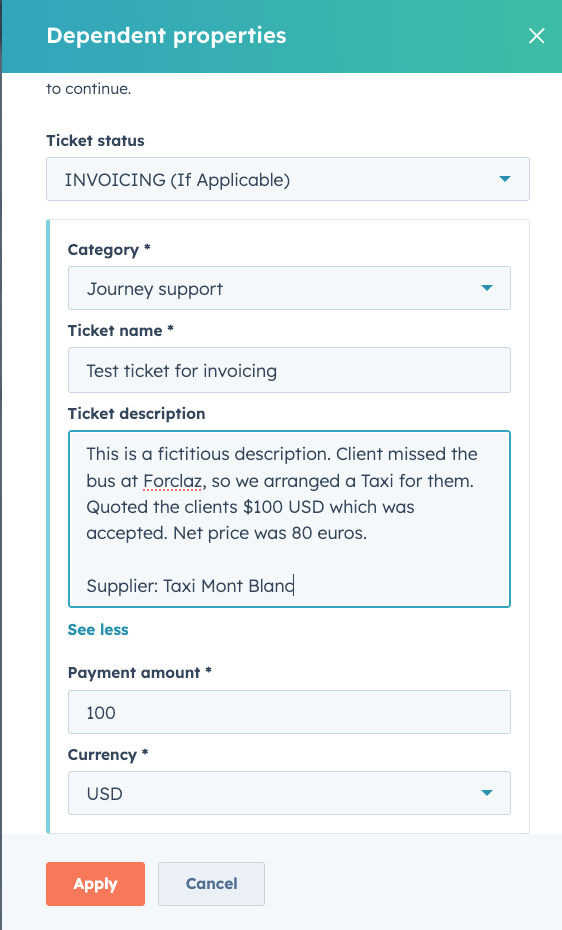
When moving the ticket, complete all required fields:
- Payment Amount: amount client owes PE
- Ticket Name: Client name + short description: Ex: Delmenhorst - Taxi to Forclaz
- Description: what service was used and why. Note the Supplier, and net price.
- Payment Amount: What was quoted to the client
- Currency: Should be USD, unless there was an exception agreed upon
- Notes: brief explanation for Finance
Using a workflow, the ticket owner of the invoice will be assigned to the KTB.
Important:
Do not move the ticket to Invoicing if the client pays the supplier directly or if Pygmy will “cover” the charge and not invoice the client.
Automation and Next Steps
Moving a Customer Support ticket to the Invoicing status will create an associated “Supp. Invoice” ticket in the Invoicing pipeline, which the Finance team will use to track invoice processing (see below). The Customer Support ticket will remain in the Invoicing status until the Invoicing ticket is moved to the Invoice paid status, at which point it will be moved by workflow to Closed status. See workflow here.
5. FINANCE TEAM RESPONSIBILITIES
Once a ticket reaches Invoicing, Finance will:
- Send invoice to the client
- Track payments received
- Pay the supplier if applicable
- Reconcile the Ezus entry
- Close out financial tasks
QUALITY STANDARDS / CHECKS
- All Ezus entries accurate
- Correct markup applied
- Tickets moved to Invoicing only when applicable
- Client never overcharged
- Supplier never underpaid
- Clear justification documented in ticket
LINKED DOCUMENTS
- SOP 1 – Intake & Ticket Creation
- SOP 2 – On-Call & Daily Operations
- SOP 4 – End-of-Shift Reporting
- HubSpot Ticket Pipeline Guide
- Ezus Financial Entry Guide